
DP149RSBEVM

Texas Instruments
595-DP149RSBEVM
DP149RSBEVM

Fabricante:

Descripción:
Herramientas de desarrollo de interfaz EVALUATE DP149 FOR V IDEO APPLICATIONS

En existencias: 1

Existencias:
1 Se puede enviar inmediatamente
Plazo de entrega de fábrica:
12 Semanas Tiempo estimado de producción de fábrica para cantidades superiores a las que se muestran.
Mínimo: 1   Múltiples: 1   Máxima: 5
Precio unitario:
$-.--
Precio ext.:
$-.--
Est. Tarifa:

Precio (USD)

Cantidad Precio unitario
Precio ext.
$358.82 $358.82

Atributo del producto Valor de atributo Seleccionar atributo
Texas Instruments
Categoría de producto: Herramientas de desarrollo de interfaz
RoHS:
Evaluation Modules
HDMI Retimer
DP149
Marca: Texas Instruments
Descripción/Función: DP149 3.4 Gbps DP++ to HDMI retimer
Tipo de interfaz: I2C, USB
Voltaje de alimentación operativo: 5 V
Tipo de producto: Interface Development Tools
Serie: DP149RSB
Cantidad de empaque de fábrica: 1
Subcategoría: Development Tools
Peso de la unidad: 6 g
Productos encontrados:
Para mostrar productos similares, seleccione al menos una casilla de verificación
Seleccione al menos una de las casillas de verificación anteriores para mostrar productos similares en esta categoría.
Atributos seleccionados: 0

CNHTS:
8543709990
USHTS:
8473301180
TARIC:
8473302000
MXHTS:
8473300499
ECCN:
EAR99

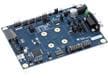
DP149RSBEVM DP++ to HDMI Retimer EVM

Texas Instruments DP149RSBEVM DP++ to HDMI Retimer Evaluation Module (EVM) is a PCB created to help customers evaluate the DP149 device for video applications. This evaluation module can also be used as a hardware reference design to implement the DP149 in the RSB package. This evaluation module is a plug-and-play design that includes an I2C programming interface for an external I2C host connection. Local I2C access is also available through a USB interface via the TUSB3410. The evaluation module includes a DC power jack (J9) to accept a 5V wall power adapter. It is also possible to power the Texas Instruments DP149RSBEVM connecting a USB micro cable from J13 to a USB host and setting the SW2 to position 3.